You can start a Spring Boot application in a few minutes. Understanding why it starts, where your business rules belong, and whether it behaves correctly takes a little more work. That understanding is what makes the framework useful beyond the first tutorial.
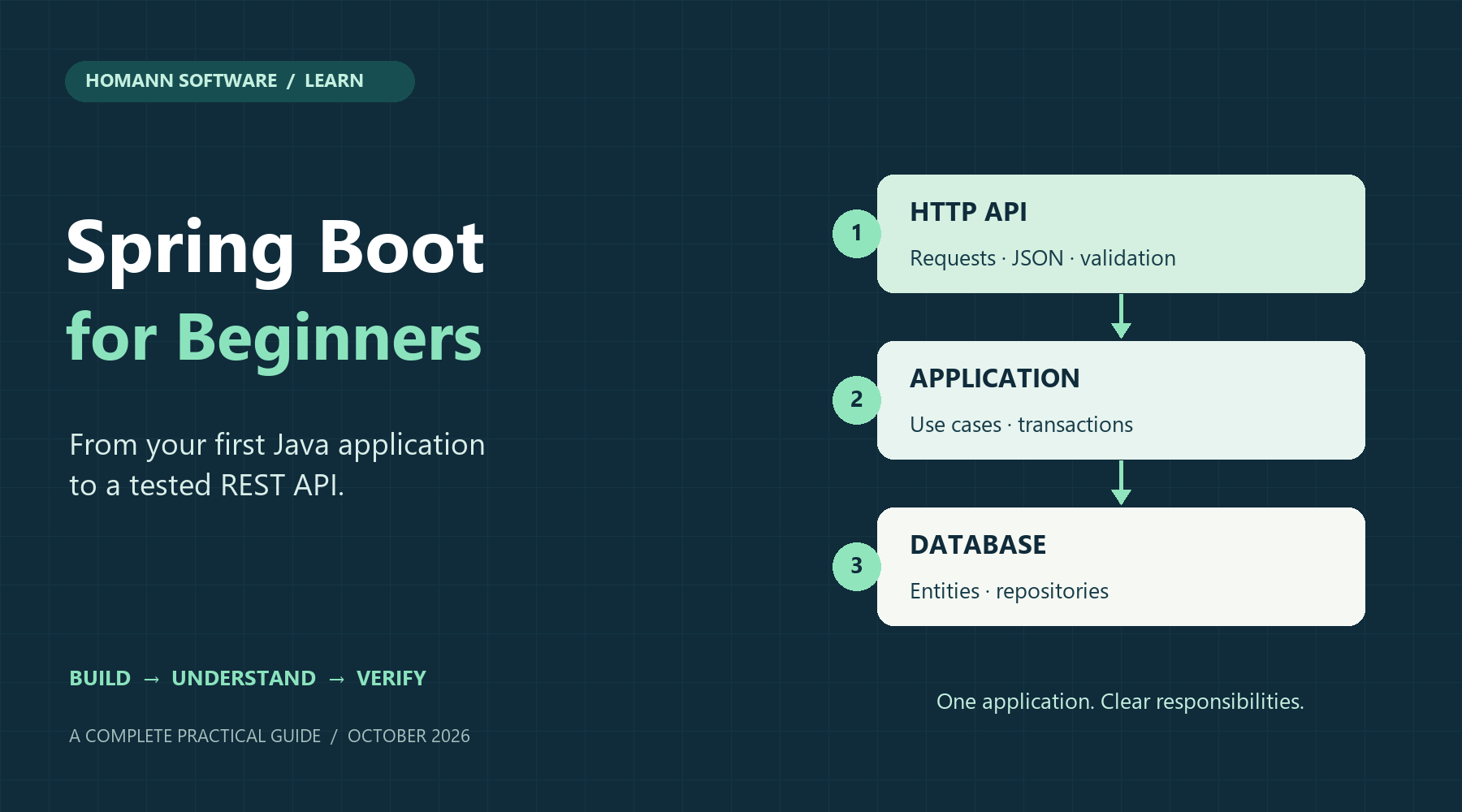
This guide builds a small task-management API from beginning to end. You will create tasks, retrieve them, mark them as completed and delete them. Along the way, you will learn dependency injection, HTTP controllers, input validation, relational persistence, transactions, error responses and automated tests.
The example uses Spring Boot 4.1.2 and Java 21. It contains eight domain unit-test cases and twenty integration-test cases, all executed successfully. The integration suite starts a real HTTP server and uses a real H2 database. A separate check also starts the packaged JAR and verifies its HTTP behavior and the loss of temporary data after a restart. These checks establish the behavior of this educational application; they do not establish production capacity or performance.
You should already be comfortable with Java classes, methods, interfaces and exceptions. If records, annotations or HTTP are new to you, the explanations below cover what you need for this project. You do not need Docker, a cloud account or a separately installed database.
Download the complete tested example, including both test classes, JavaDoc source comments, generated HTML API documentation and the setup instructions. You can follow the article without downloading anything, or run the project locally as you read.
What is current, and why this topic matters
Research checked on October 26, 2026. Spring announced Spring Boot 4.1.2 on October 23. The 4.2 documentation explicitly labels 4.2.0-RC1 as a development version. This tutorial pins the stable release rather than asking a beginner to start with a release candidate.
For a Java engineering and software architecture audience, three developments deserve attention:
- The Boot 4 generation brings a more modular dependency structure. Its release notes describe focused main and test starters, HTTP service-client configuration and API versioning. This matters when an older tutorial's dependency or import no longer matches a new project.
- Observability is part of application engineering. The Boot reference describes its integration with Micrometer Observation, connecting application behavior to metrics and traces. Beginners can start with health checks and learn instrumentation as the application grows.
- Deployment has options beyond a traditional server installation. Boot documents container images through Cloud Native Buildpacks and GraalVM native executables. These are useful later; the executable JAR is a clear first deployment model.
This is an editorial selection of developments relevant to learning Spring Boot, not a measured popularity ranking. The central topic is a current, testable foundation for Java application development. Once you can follow a request through one application, advanced architecture decisions become easier to assess.
Homann Software already has a beginner's guide to Spring, Spring Boot, Spring Modulith and DDD. The present article concentrates on Boot itself, HTTP, persistence and testing. The modular architecture guide is a useful next step.
1. Understand Java, Spring and Spring Boot
Java is the programming language and runtime platform. You write classes, compile them and run the resulting application on a Java Virtual Machine, or JVM.
Spring Framework supplies infrastructure for Java applications, including an object container, web request handling and transaction management. Its object container creates and connects the application objects that it manages. Those managed objects are called beans.
Spring Boot builds on Spring. It supplies a coordinated dependency set, application startup, conditional configuration and operational integrations. The project overview describes standalone applications, starters and embedded servers. You still write the application behavior.
| Term | What it means in this tutorial |
|---|---|
| Spring bean | An object managed by Spring, such as TaskService |
| Dependency injection | Supplying the objects that another object needs |
| Starter | A dependency that brings a useful group of libraries |
| Auto-configuration | Conditional setup based on dependencies and configuration |
| Embedded server | The HTTP server starts inside the application process |
| Repository | An abstraction for storing and retrieving entities |
| DTO | A data transfer object defining input or output data |
| JPA | Jakarta Persistence, an API for mapping Java entities to relational data |
| Hibernate | The JPA implementation used by this example |
Spring Boot is suitable for APIs, business applications, integration services and many other Java workloads. You do not need to start with microservices. One deployable application is enough to learn the request path and keep responsibilities clear.
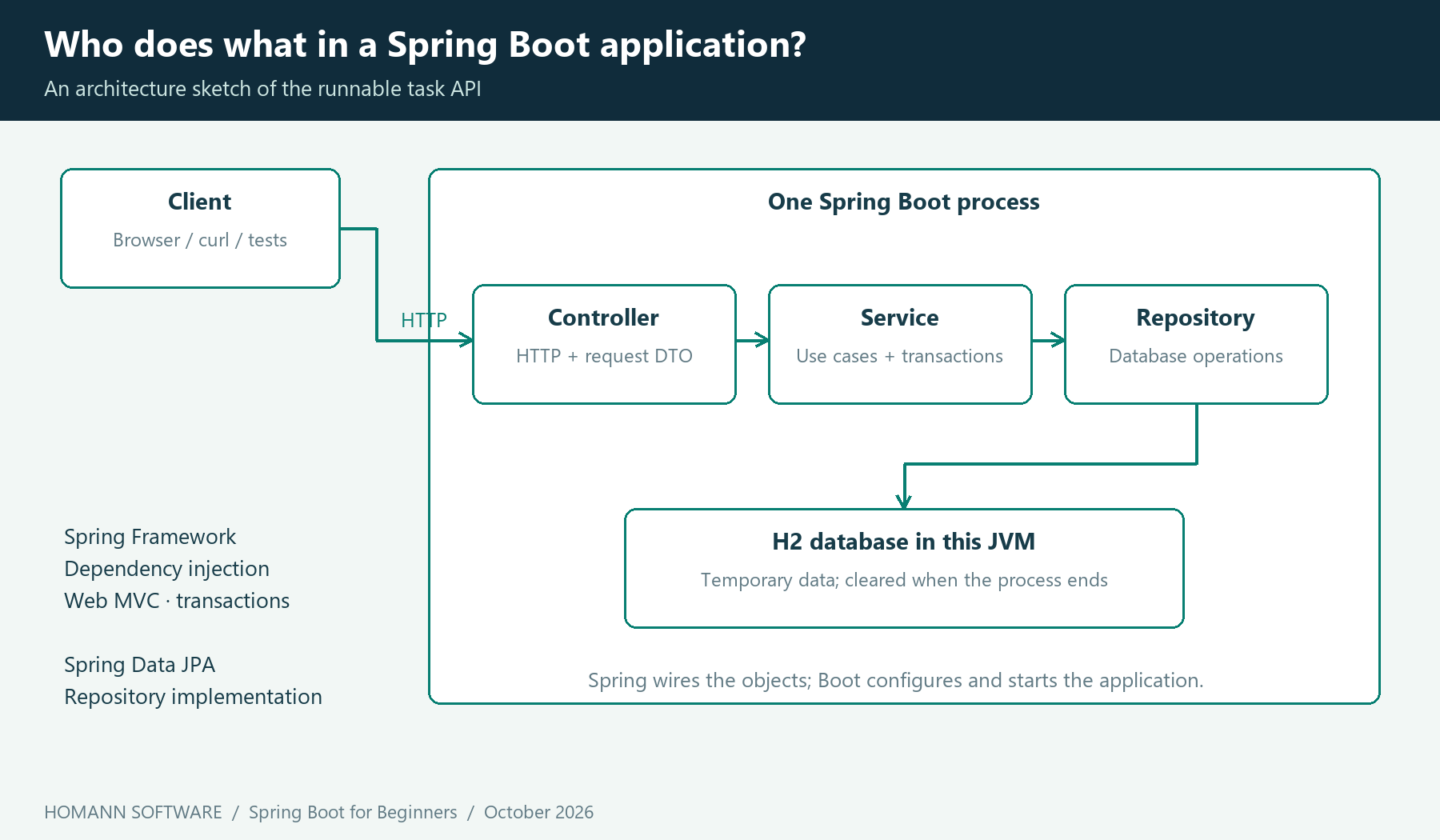
The application is one process. The controller handles HTTP, the service coordinates a use case, and the repository provides persistence operations. This is an architecture sketch rather than a formal UML component model.
2. Dependency injection: make dependencies visible
Imagine that a controller needs a service. One option is to construct the service inside the controller, which also means deciding how to construct the service's dependencies. As the system grows, each object becomes responsible for building part of the application.
With constructor injection, the controller declares what it needs in its constructor. Spring supplies the service when it creates the controller. The Spring dependency-injection documentation explains this inversion of responsibility.
In the complete controller below, TaskController(TaskService tasks) makes the dependency explicit. The field is final, and there is one constructor. You do not need field injection or an @Autowired annotation on that single constructor.
A bean is still a Java object. The Task entity can be tested by constructing it directly. You should use the container when the behavior under test needs its wiring, HTTP infrastructure or transaction support.
3. Install the tools and create the project
Install a JDK and Maven, then check java -version and mvn -version. A JDK contains the compiler as well as the runtime. Maven must use the intended JDK; mvn -version shows which one it selected.
The Boot 4.1.2 system requirements specify Java 17 or later, compatibility through Java 27 and Maven 3.6.3 or later. This package was built with Eclipse Temurin 21.0.11 and Maven 3.9.11. Java 21 is the source target, so the example needs no preview-language flags.
You can use Spring Initializr to generate the starting project. Select Maven, Java, a stable Boot version, JAR packaging and Java 21. Choose Spring Web, Validation, Spring Data JPA, H2 Database and Spring Boot Actuator. UI labels can vary; the POM below is the exact tested dependency configuration.
The supplied source package is also a complete starting point. Its application directory is examples/. Run the Maven commands in that directory. If you create the project manually, put the following in pom.xml:
<project xmlns="http://maven.apache.org/POM/4.0.0" xmlns:xsi="http://www.w3.org/2001/XMLSchema-instance"
         xsi:schemaLocation="http://maven.apache.org/POM/4.0.0 https://maven.apache.org/xsd/maven-4.0.0.xsd">
  <modelVersion>4.0.0</modelVersion>
  <parent>
    <groupId>org.springframework.boot</groupId>
    <artifactId>spring-boot-starter-parent</artifactId>
    <version>4.1.2</version>
    <relativePath/>
  </parent>
  <groupId>com.homannsoftware</groupId>
  <artifactId>task-api</artifactId>
  <version>1.0.0</version>
  <properties><java.version>21</java.version></properties>
  <dependencies>
    <dependency>
      <groupId>org.springframework.boot</groupId>
      <artifactId>spring-boot-starter-webmvc</artifactId>
    </dependency>
    <dependency>
      <groupId>org.springframework.boot</groupId>
      <artifactId>spring-boot-starter-validation</artifactId>
    </dependency>
    <dependency>
      <groupId>org.springframework.boot</groupId>
      <artifactId>spring-boot-starter-data-jpa</artifactId>
    </dependency>
    <dependency>
      <groupId>org.springframework.boot</groupId>
      <artifactId>spring-boot-starter-actuator</artifactId>
    </dependency>
    <dependency>
      <groupId>com.h2database</groupId>
      <artifactId>h2</artifactId>
      <scope>runtime</scope>
    </dependency>
    <dependency>
      <groupId>org.springframework.boot</groupId>
      <artifactId>spring-boot-starter-test</artifactId>
      <scope>test</scope>
    </dependency>
  </dependencies>
  <build>
    <plugins>
      <plugin>
        <groupId>org.springframework.boot</groupId>
        <artifactId>spring-boot-maven-plugin</artifactId>
      </plugin>
      <plugin>
        <groupId>org.apache.maven.plugins</groupId>
        <artifactId>maven-javadoc-plugin</artifactId>
        <version>3.11.2</version>
        <configuration>
          <doclint>all</doclint>
          <failOnWarnings>true</failOnWarnings>
          <additionalOptions><additionalOption>-Werror</additionalOption></additionalOptions>
        </configuration>
      </plugin>
    </plugins>
  </build>
</project>
The parent pins Boot to 4.1.2. The managed dependencies do not each need a separate version. Boot's build-system documentation explains its curated dependency set. Avoid independently upgrading Hibernate, Jackson and Spring Framework just because a search result suggests a newer version.
spring-boot-starter-webmvc provides the servlet-based web stack used here. The validation starter supplies Bean Validation support. Data JPA supplies persistence integration. H2 is the local database; Actuator adds operational endpoints. The test starter supplies the testing libraries used by the suite.
If your generated project contains mvnw and mvnw.cmd, you can use its Maven Wrapper. This package uses an installed Maven and does not include wrapper files.
4. Put the startup class above the feature package
The important project files are:
examples/
  pom.xml
  src/main/java/com/homannsoftware/tasks/
    TaskApplication.java
    task/
      Task.java
      CreateTask.java
      TaskView.java
      TaskRepository.java
      TaskService.java
      TaskController.java
      TaskNotFound.java
      ApiErrors.java
  src/main/resources/application.properties
  src/test/java/com/homannsoftware/tasks/task/
    TaskTest.java
    TaskApiTest.java
Grouping the task feature in one package keeps its related responsibilities together. The startup class belongs in the parent package. That placement follows the Boot guidance on component scanning and application structure.
TaskApplication.java is the entry point:
package com.homannsoftware.tasks;

import org.springframework.boot.SpringApplication;
import org.springframework.boot.autoconfigure.SpringBootApplication;

/** Starts the local task API and supplies its root configuration package. */
@SpringBootApplication
public class TaskApplication {
    /** Creates the configuration instance managed by Spring. */
    public TaskApplication() {}

    /**
     * Starts Spring and the embedded HTTP server.
     * @param args command-line configuration, such as {@code --server.port=8081}
     */
    public static void main(String[] args) {
        SpringApplication.run(TaskApplication.class, args);
    }
}
@SpringBootApplication combines application configuration, auto-configuration and component scanning. SpringApplication.run creates and starts the application context. With the web dependencies present, startup also creates the embedded web server.
Auto-configuration is conditional. For example, Boot can configure an embedded database when the appropriate libraries are present. Your own configuration can replace relevant defaults. The auto-configuration reference explains both the conditions and the diagnostic --debug switch. This is useful when you want to understand which configuration applied.
5. Define the API contract before implementation
HTTP is the protocol through which the client sends a request and receives a response. Each request has a method, such as GET or POST, and a target URL. JSON is the text format used for request and response data. Here, the API exposes task resources through URLs and uses HTTP methods to express operations. The server retains task data, but each request identifies its own target without a client-specific conversation session.
The example has five operations:
| Request | Meaning | Successful response |
|---|---|---|
POST /api/tasks |
Create a task from a JSON title | 201 Created, body and Location header |
GET /api/tasks |
List tasks ordered by ID | 200 OK, JSON array |
GET /api/tasks/{id} |
Read one task | 200 OK, task JSON |
PUT /api/tasks/{id}/completion |
Set the task to completed | 200 OK, updated task JSON |
DELETE /api/tasks/{id} |
Delete one task | 204 No Content |
A new task starts incomplete. The title must contain a non-whitespace character and must be at most 120 Java UTF-16 code units before surrounding whitespace is stripped. That last detail matters: this is a simple Java string-length rule, not a count of user-perceived characters in every writing system.
Completion is idempotent: repeating it leaves the task completed. Creating a task is not idempotent: two successful create requests produce two tasks. Unknown task IDs return 404. Invalid request data returns 400. Clients should use the returned ID or Location rather than assuming that IDs are consecutive or always start at 1.
This example deliberately has no rename operation, deadlines, ownership or user accounts. Those are additional use cases with their own rules, rather than reasons to make the first endpoint harder to understand.
6. Model a task and its persistence
Task.java is a JPA entity:
package com.homannsoftware.tasks.task;

import jakarta.persistence.*;

/**
 * A persisted task with a title and an irreversible completion state.
 * The version field lets JPA reject stale updates; it is not part of the API.
 */
@Entity
@Table(name = "tasks")
public class Task {
    @Id
    @GeneratedValue(strategy = GenerationType.IDENTITY)
    private Long id;

    @Column(nullable = false, length = 120)
    private String title;

    @Column(nullable = false)
    private boolean completed;

    @Version
    private long version;

    /** Creates an uninitialized instance for the JPA persistence provider. */
    protected Task() {}

    /**
     * Creates an incomplete task and strips surrounding whitespace from its title.
     * @param title nonblank title, at most 120 UTF-16 code units before stripping
     * @throws IllegalArgumentException if the title is null, blank or too long
     */
    public Task(String title) {
        if (title == null || title.isBlank() || title.length() > 120) {
            throw new IllegalArgumentException("Title must contain 1 to 120 characters");
        }
        this.title = title.strip();
    }

    /** Marks this task completed; repeated calls leave it completed. */
    public void complete() { completed = true; }
    /**
     * Reads the identity assigned by persistence.
     * @return database-generated identity, or null before one is assigned
     */
    public Long getId() { return id; }
    /**
     * Reads the task title.
     * @return normalized title after construction or persistence loading
     */
    public String getTitle() { return title; }
    /**
     * Reads the task's completion state.
     * @return whether completion has been recorded for this task
     */
    public boolean isCompleted() { return completed; }
}
The @Entity annotation marks the class for persistence, and @Table selects its table name. @Id identifies the primary key. With IDENTITY, the database generates the ID. The protected no-argument constructor is for the persistence provider.
The public constructor enforces the title rule even when the object is created outside HTTP handling. complete() expresses a business action without exposing a general setter for every field. @Column defines storage mapping; it does not replace request validation.
@Version supports optimistic locking: Hibernate checks an entity's version when writing a change, allowing stale updates to be rejected. The source package includes a deterministic test that loads two detached copies, saves one and verifies rejection of the stale copy. This is a focused persistence check, not a concurrent-load benchmark. The Jakarta Persistence specification documents entity requirements and version-based locking.
TaskRepository.java supplies the persistence interface:
package com.homannsoftware.tasks.task;

import org.springframework.data.jpa.repository.JpaRepository;

/** Provides JPA storage operations for tasks identified by {@link Long} IDs. */
public interface TaskRepository extends JpaRepository<Task, Long> {}
Task is the entity type and Long is its ID type. Spring Data provides an implementation at runtime. The Boot SQL reference describes repositories and JPA integration. You still need to understand the queries, transactions and amount of data your application accesses.
7. Keep request and response data separate from the entity
The request DTO describes what a client may supply. A Java record is a concise immutable data carrier with a constructor and accessor methods generated by the language.
CreateTask.java:
package com.homannsoftware.tasks.task;

import jakarta.validation.constraints.NotBlank;
import jakarta.validation.constraints.Size;

/**
 * Input accepted by the create-task HTTP endpoint.
 * Validation applies to the raw title before the entity normalizes whitespace.
 * @param title nonblank title, at most 120 UTF-16 code units
 */
public record CreateTask(@NotBlank @Size(max = 120) String title) {}
@NotBlank rejects null, empty and whitespace-only titles. @Size applies the maximum length. The controller's @Valid activates validation of the deserialized request DTO, as described in the Spring MVC validation reference.
The response DTO makes the API shape deliberate. The client sees the ID, title and completion state, without persistence-specific fields such as version.
TaskView.java:
package com.homannsoftware.tasks.task;

/**
 * Public task representation, independent of JPA implementation fields.
 * @param id database-assigned task identity
 * @param title normalized task title
 * @param completed whether the task has been completed
 */
public record TaskView(Long id, String title, boolean completed) {
    /**
     * Copies entity state while the service transaction is active.
     * @param task persisted task to expose
     * @return immutable representation of its current state
     */
    static TaskView from(Task task) {
        return new TaskView(task.getId(), task.getTitle(), task.isCompleted());
    }
}
Separating these types lets the database model and public API evolve for different reasons. It also prevents a client from setting internal entity state simply by adding properties to an HTTP request.
8. Implement use cases in a transactional service
The service coordinates task operations. It is the right place to express the transaction boundary for this small application.
TaskService.java:
package com.homannsoftware.tasks.task;

import java.util.List;
import org.springframework.data.domain.Sort;
import org.springframework.stereotype.Service;
import org.springframework.transaction.annotation.Transactional;

/**
 * Coordinates task use cases within service-level transaction boundaries.
 * Write methods override the default read-only transaction configuration.
 */
@Service
@Transactional(readOnly = true)
public class TaskService {
    private final TaskRepository tasks;

    /**
     * Receives the repository through constructor injection.
     * @param tasks repository used for task persistence
     */
    public TaskService(TaskRepository tasks) { this.tasks = tasks; }

    /**
     * Creates and stores an incomplete task.
     * @param title raw title to validate and normalize
     * @return representation containing the assigned identity
     * @throws IllegalArgumentException if the title is null, blank or too long
     */
    @Transactional
    public TaskView create(String title) {
        return TaskView.from(tasks.save(new Task(title)));
    }

    /**
     * Reads the entire tutorial dataset in ascending identity order.
     * @return all tasks, or an empty list; this operation is not paginated
     */
    public List<TaskView> list() {
        return tasks.findAll(Sort.by("id")).stream().map(TaskView::from).toList();
    }

    /**
     * Reads one task.
     * @param id task identity to find
     * @return current task representation
     * @throws TaskNotFound if the identity does not exist
     */
    public TaskView get(long id) { return TaskView.from(require(id)); }

    /**
     * Sets completion without changing the title; repeating this is idempotent.
     * JPA persists the managed entity change when the transaction commits.
     * @param id task identity to complete
     * @return representation with completion set to true
     * @throws TaskNotFound if the identity does not exist
     */
    @Transactional
    public TaskView complete(long id) {
        Task task = require(id);
        task.complete();
        return TaskView.from(task);
    }

    /**
     * Deletes an existing task.
     * @param id task identity to remove
     * @throws TaskNotFound if the identity does not exist
     */
    @Transactional
    public void delete(long id) { tasks.delete(require(id)); }

    private Task require(long id) {
        return tasks.findById(id).orElseThrow(() -> new TaskNotFound(id));
    }
}
@Service makes this class discoverable as a bean. Constructor injection gives it its repository. Read methods inherit @Transactional(readOnly = true), while write methods override that with ordinary transactions. A read-only transaction is an optimization hint; do not treat it as authorization to read or as a universal database write prohibition.
In complete, require retrieves a managed entity inside the transaction. Changing it is enough for JPA to detect and persist the change when the transaction commits. An explicit save is not needed for that managed entity. This relationship between service boundaries and JPA updates is covered by the Spring Data transaction documentation.
Transactions are applied through a Spring proxy. In the usual proxy mode, an external call through the bean receives transaction advice; a call from one method to another on the same instance does not pass through that proxy. Keep that in mind when refactoring transaction boundaries; the Framework transaction guide explains this limitation.
list retrieves all tasks and sorts them by ID. That is convenient for a tiny tutorial dataset. A real growing task list needs pagination and a suitable query contract.
When an ID is absent, the service throws a specific exception:
package com.homannsoftware.tasks.task;

/** Signals that a requested task identity does not exist in storage. */
public class TaskNotFound extends RuntimeException {
    /**
     * Describes the missing identity without exposing database internals.
     * @param id task identity that could not be found
     */
    public TaskNotFound(long id) { super("Task " + id + " was not found"); }
}
9. Connect the service to HTTP
TaskController.java translates HTTP operations into service calls:
package com.homannsoftware.tasks.task;

import java.net.URI;
import java.util.List;
import jakarta.validation.Valid;
import org.springframework.http.ResponseEntity;
import org.springframework.web.bind.annotation.*;

/** Maps task HTTP requests to use cases and returns explicit API DTOs. */
@RestController
@RequestMapping("/api/tasks")
public class TaskController {
    private final TaskService tasks;

    /**
     * Receives the application service through constructor injection.
     * @param tasks service implementing task use cases
     */
    public TaskController(TaskService tasks) { this.tasks = tasks; }

    /**
     * Creates a task after Spring MVC validates the request body.
     * @param request validated title input
     * @return HTTP 201 with the created task and its resource Location
     */
    @PostMapping
    public ResponseEntity<TaskView> create(@Valid @RequestBody CreateTask request) {
        TaskView task = tasks.create(request.title());
        return ResponseEntity.created(URI.create("/api/tasks/" + task.id())).body(task);
    }

    /**
     * Lists the tutorial dataset.
     * @return HTTP response body listing all tasks in ascending ID order
     */
    @GetMapping
    public List<TaskView> list() { return tasks.list(); }

    /**
     * Reads a task identified by a URL path segment.
     * @param id requested task identity
     * @return HTTP response body describing the task
     * @throws TaskNotFound if no task has that identity; mapped to HTTP 404
     */
    @GetMapping("/{id}")
    public TaskView get(@PathVariable long id) { return tasks.get(id); }

    /**
     * Sets completion using an idempotent HTTP operation with no request body.
     * @param id requested task identity
     * @return HTTP response body showing the completed task
     * @throws TaskNotFound if no task has that identity; mapped to HTTP 404
     */
    @PutMapping("/{id}/completion")
    public TaskView complete(@PathVariable long id) { return tasks.complete(id); }

    /**
     * Removes an existing task.
     * @param id requested task identity
     * @return HTTP 204 with no response body
     * @throws TaskNotFound if no task has that identity; mapped to HTTP 404
     */
    @DeleteMapping("/{id}")
    public ResponseEntity<Void> delete(@PathVariable long id) {
        tasks.delete(id);
        return ResponseEntity.noContent().build();
    }
}
@RestController marks a controller whose return values are written to the response body. @RequestMapping gives all operations a common path. The HTTP method annotations select individual endpoints.
@RequestBody reads JSON into CreateTask. @PathVariable converts a path segment into the long ID. Spring's configured HTTP message converters serialize TaskView to JSON. The servlet web reference explains Spring MVC's controller model.
ResponseEntity lets the create endpoint choose the HTTP status and headers. 201 Created identifies successful creation; Location points to the newly created resource. The delete operation deliberately returns no response body.
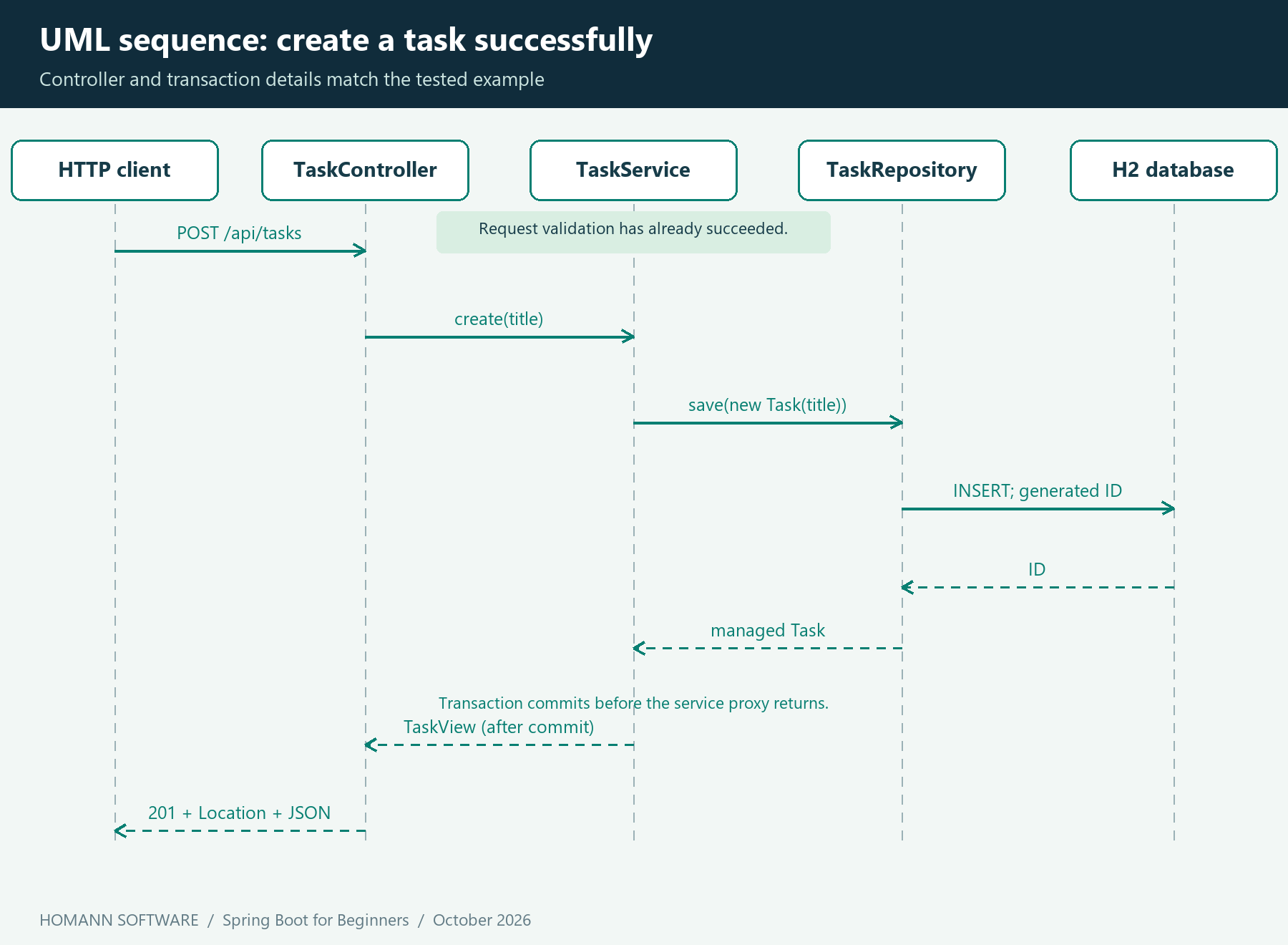
The UML sequence shows the successful path. Validation has succeeded before the controller calls the service. The service proxy completes the transaction before returning to the controller. Persistence failures can therefore prevent the success response.
10. Return consistent errors
A missing task should become a meaningful HTTP error. It should not leak a stack trace or appear as an unexplained server failure.
ApiErrors.java:
package com.homannsoftware.tasks.task;

import org.springframework.dao.OptimisticLockingFailureException;
import org.springframework.http.HttpStatus;
import org.springframework.http.ProblemDetail;
import org.springframework.web.bind.annotation.ExceptionHandler;
import org.springframework.web.bind.annotation.RestControllerAdvice;
import org.springframework.web.servlet.mvc.method.annotation.ResponseEntityExceptionHandler;

/**
 * Maps application failures to RFC 9457 Problem Details.
 * Inherited handlers cover Spring MVC request and validation failures.
 */
@RestControllerAdvice
public class ApiErrors extends ResponseEntityExceptionHandler {
    /** Creates the shared HTTP exception handler managed by Spring. */
    public ApiErrors() {}

    /**
     * Translates a missing task into a public HTTP 404 problem.
     * @param error application failure identifying the missing task
     * @return problem detail with NOT_FOUND status and the missing identity
     */
    @ExceptionHandler(TaskNotFound.class)
    public ProblemDetail missing(TaskNotFound error) {
        return ProblemDetail.forStatusAndDetail(HttpStatus.NOT_FOUND, error.getMessage());
    }

    /**
     * Translates stale persistence writes into an HTTP 409 conflict.
     * @param error persistence failure, deliberately excluded from public detail
     * @return problem detail advising the client to read current state
     */
    @ExceptionHandler(OptimisticLockingFailureException.class)
    public ProblemDetail conflict(OptimisticLockingFailureException error) {
        return ProblemDetail.forStatusAndDetail(HttpStatus.CONFLICT,
                "Task changed concurrently; read it again before retrying");
    }
}
@RestControllerAdvice applies error handling across the controllers. Extending ResponseEntityExceptionHandler also provides handling for common MVC exceptions, including invalid request bodies and malformed JSON. The Spring error-response reference documents RFC 9457 Problem Details.
A missing task produces a 404 response with application/problem+json, a numeric status and a detail such as Task 999999 was not found. The exact text of built-in validation messages is not the API contract used by these tests; the status and problem representation are checked instead.
The optimistic-lock handler maps a persistence conflict to 409 and asks the client to read current state. The suite verifies stale-write rejection at the repository boundary. It does not force simultaneous HTTP requests to exercise the 409 mapping under load. Avoid interpreting the existence of an exception handler as evidence that every possible concurrent business operation is correct.
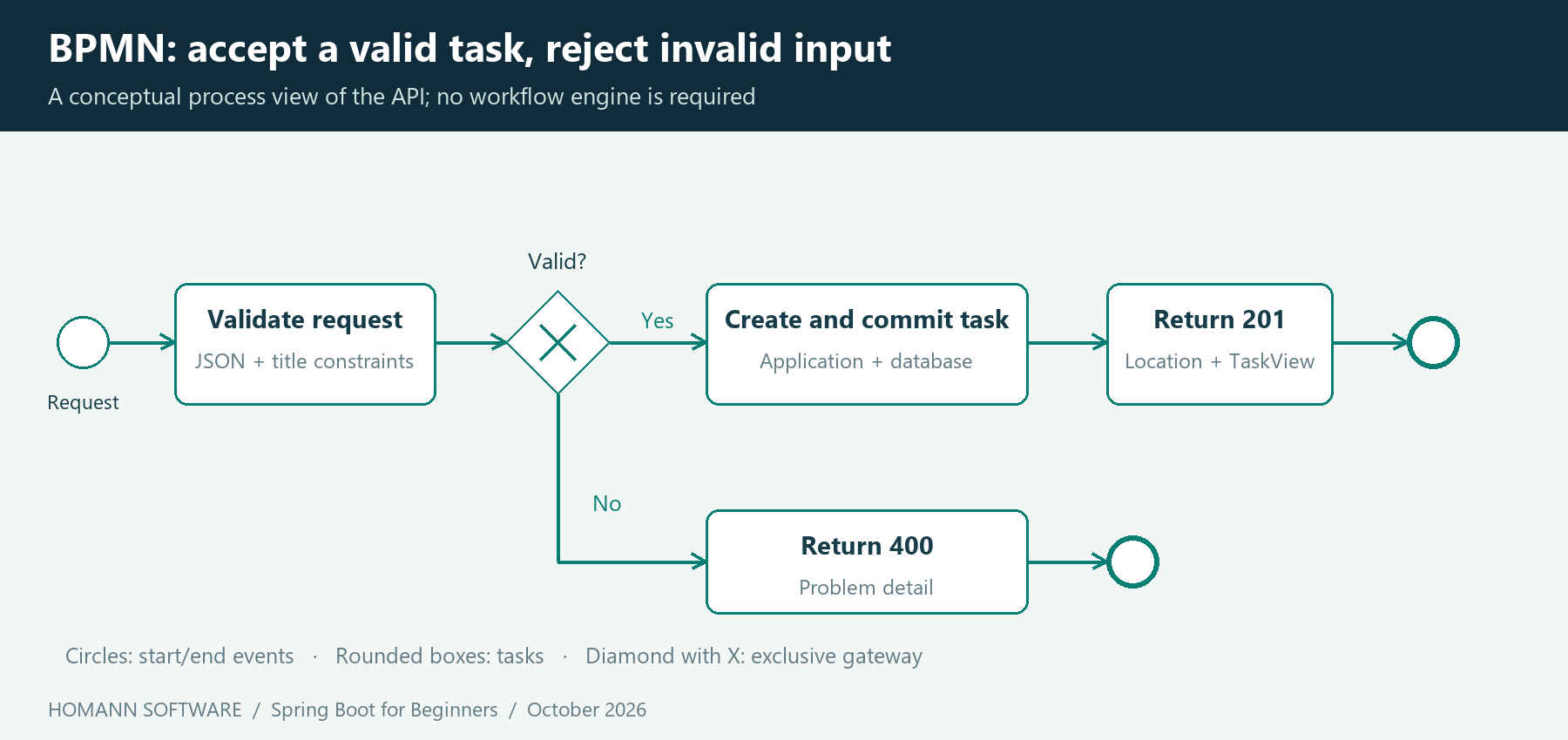
The BPMN view explains the normal valid and invalid-input paths. Database outages and concurrent conflicts are outside this simplified process. It is a documentation model; the application does not run a BPMN engine. Editable BPMN 2.0 XML and PlantUML source are included in the article package.
11. Configure a disposable local database
Use this src/main/resources/application.properties:
spring.application.name=task-api
server.address=127.0.0.1
spring.datasource.url=jdbc:h2:mem:tasks;DB_CLOSE_DELAY=-1;DB_CLOSE_ON_EXIT=FALSE
spring.datasource.username=sa
spring.datasource.password=
spring.jpa.hibernate.ddl-auto=create-drop
spring.jpa.open-in-view=false
management.endpoints.web.exposure.include=health
management.endpoint.health.show-details=never
The server binds to 127.0.0.1, so the tutorial API is available on the local machine. The H2 URL selects an in-memory database. DB_CLOSE_DELAY=-1 keeps it alive when a connection closes; it does not preserve data after the JVM exits. create-drop creates the tutorial schema at startup and drops it at normal shutdown. A fresh process starts with an empty task list.
This database configuration is disposable. Do not use it for information you need to retain. The restart smoke check explicitly confirms that a previously created task disappears after the packaged application restarts.
spring.jpa.open-in-view=false keeps persistence work out of response rendering. The service creates DTOs while its transaction is active. The application exposes only the health endpoint through Actuator and keeps health details hidden.
Boot supports property files, environment variables and command-line arguments through externalized configuration. For example, --server.port=8081 overrides the port without changing source code. Profiles can separate environment-specific configuration. A profile name does not itself secure a system or provide durable storage.
12. Build the application and try it
Open a terminal in examples/ and run:
mvn clean verify
java -jar target/task-api-1.0.0.jar
The first command compiles the code, runs the tests and packages the application. The second starts the packaged JAR. Leave that terminal running and use another terminal for requests. The default local URL is http://127.0.0.1:8080.
The following commands work in a POSIX shell. On Windows PowerShell, use the native examples immediately below, which avoid shell-specific JSON quoting.
curl -i -H 'Content-Type: application/json' -d '{"title":"Learn Spring Boot"}' http://127.0.0.1:8080/api/tasks
curl http://127.0.0.1:8080/api/tasks
PowerShell:
$task = Invoke-RestMethod -Method Post -Uri 'http://127.0.0.1:8080/api/tasks' -ContentType 'application/json' -Body (@{ title = 'Learn Spring Boot' } | ConvertTo-Json)
Invoke-RestMethod -Uri "http://127.0.0.1:8080/api/tasks/$($task.id)"
Invoke-RestMethod -Method Put -Uri "http://127.0.0.1:8080/api/tasks/$($task.id)/completion"
Invoke-RestMethod -Method Delete -Uri "http://127.0.0.1:8080/api/tasks/$($task.id)"
The create response has this shape; the ID is generated and may differ:
{"id":1,"title":"Learn Spring Boot","completed":false}
Now submit an empty title. Expect 400 and no additional task. Request an unknown ID and expect 404. Complete an existing task twice and observe that it remains completed. These are useful manual checks because they make the contract visible; the automated suite repeats them reliably.
To use another port, stop the application and run:
java -jar target/task-api-1.0.0.jar --server.port=8081
Update your request URLs accordingly. Stop the process with Ctrl+C when finished.
13. Test behavior at the appropriate boundary
A useful test tells you whether a requirement holds. For this application, the important requirements are correct state changes, rejected input, meaningful HTTP responses and durable changes within the lifetime of the demo database.
The unit tests instantiate the entity directly. They need neither a server nor a Spring context:
package com.homannsoftware.tasks.task;

import org.junit.jupiter.api.Test;
import org.junit.jupiter.params.ParameterizedTest;
import org.junit.jupiter.params.provider.NullAndEmptySource;
import org.junit.jupiter.params.provider.ValueSource;
import static org.assertj.core.api.Assertions.*;

class TaskTest {
    @Test void newTaskIsOpenAndTitleIsStripped() {
        Task task = new Task("  Learn Spring Boot  ");
        assertThat(task.getTitle()).isEqualTo("Learn Spring Boot");
        assertThat(task.isCompleted()).isFalse();
    }
    @Test void completingTwiceKeepsTheTaskCompleted() {
        Task task = new Task("Read the guide");
        task.complete(); task.complete();
        assertThat(task.isCompleted()).isTrue();
    }
    @ParameterizedTest @NullAndEmptySource @ValueSource(strings = {" ", "\t\n"})
    void rejectsMissingTitle(String title) {
        assertThatIllegalArgumentException().isThrownBy(() -> new Task(title));
    }
    @Test void acceptsBoundary() { assertThat(new Task("x".repeat(120)).getTitle()).hasSize(120); }
    @Test void rejectsLongTitle() {
        assertThatIllegalArgumentException().isThrownBy(() -> new Task("x".repeat(121)));
    }
}
The integration class uses @SpringBootTest(webEnvironment = SpringBootTest.WebEnvironment.RANDOM_PORT). Boot starts the server on an available port; a JDK HttpClient sends requests to it. The Boot testing reference explains the difference between a mock web environment and a real random-port server.
TaskApiTest.java is included in full in the source package. Its checks cover successful creation and the Location header, normalized storage, single-task retrieval, empty and populated lists, repeated completion, deletion, missing IDs, missing/null/empty/blank titles, length boundaries, malformed JSON, nonnumeric IDs, an unsupported content type, health and stale-write rejection.
Tests clear the repository before each case. They do not rely on an outer test transaction rolling back HTTP writes: real server requests execute on other threads and have their own transactions. This is a practical reason to understand what a test annotation actually changes.
The recorded Maven result is:
Tests run: 28, Failures: 0, Errors: 0, Skipped: 0
BUILD SUCCESS
The separate JAR check verifies the artifact produced by Maven, including command-line port configuration and a process restart. Neither check uses PostgreSQL, builds a container, creates a native image or measures throughput. H2 is useful for this first lesson; database-specific behavior must later be tested against the production database.
Generate and read the JavaDoc
The public application types, constructors and methods include JavaDoc explaining their contracts. Parameters, return values and relevant exceptions are documented where applicable. For example, Task describes its title-length rule, while TaskService.complete explains idempotence and transaction-based persistence. These comments describe behavior that callers need to understand; the tests verify that behavior.
The Maven JavaDoc plugin generates HTML API documentation from these comments. The example pins its plugin version and enables all JavaDoc DocLint checks, treating documentation warnings as build failures. From examples/, run:
mvn javadoc:javadoc
Open target/reports/apidocs/index.html after generation. A pre-generated copy is also included at docs/api/index.html in the download. JavaDoc generation passed with no documentation warnings. It checks documentation syntax and completeness within DocLint's scope; it does not prove the accuracy of every description.
14. Health, logs and observability
Open http://127.0.0.1:8080/actuator/health while the application runs. In the supplied configuration, a healthy response contains "status":"UP"; it can also list health groups. The integration and JAR checks verify this endpoint. The Actuator endpoint documentation distinguishes endpoint availability, exposure and security.
Health answers a limited question. It does not tell you whether a user can finish every business operation. As the application grows, choose metrics and traces around useful questions: request duration, failures, database behavior and completed use cases. The tutorial does not configure an external telemetry backend.
Read startup logs before changing dependencies when something fails. A port collision, a missing configuration value and an unreachable database are different problems. A useful diagnostic identifies the failing boundary and preserves enough context to investigate it. Avoid putting credentials or sensitive request bodies into logs.
15. Common beginner problems
| Symptom | Likely cause | What to check |
|---|---|---|
| The compiler rejects the configured Java release | Maven is using another JDK | Compare java -version, mvn -version and JAVA_HOME |
| Startup says the port is already in use | Another process owns the port | Stop that process or supply another server.port |
| Spring cannot find a service or repository | Package placement or missing annotation | Keep feature code below TaskApplication and check the exact dependency |
| A request returns 400 | JSON, validation or ID conversion failed | Inspect the problem response and request content type |
| A request returns 404 | Wrong path or absent task | Check the method, path and returned task ID |
| Old sample imports do not compile | The sample targets another Boot generation | Match the source documentation and dependency version |
| Tasks disappear after restart | The tutorial uses in-memory H2 | Replace the storage setup when persistence is required |
| Adding Security produces 401 or 403 | Authentication or authorization is now active | Configure the intended security model and test its rules |
Follow one failing request through the controller, service and repository. Reading that path is usually more productive than adding annotations until startup succeeds.
16. What must change before production
The sample is a local teaching application. Turning it into a service for real users requires explicit decisions:
- Add identity and authorization, including who may read or change each task. Spring Security supports request-level authorization; resource ownership still needs an application rule and tests.
- Replace in-memory H2 with durable storage, introduce reviewed schema migrations, and verify backup and restore.
create-dropis unsuitable for retained business data. - Test against the actual database, including queries, constraints and transaction behavior. Add pagination before returning an unbounded user dataset.
- Define transport security, secret management, request limits, timeouts and operational alerts for the chosen deployment environment.
- Handle business concurrency deliberately. A version column can reject a stale write; it cannot decide whether a multi-step business action is valid.
- Build a repeatable delivery pipeline that runs relevant tests and packages a known artifact. Keep dependency updates and deployment configuration reviewable.
The executable JAR can run on a suitable JVM. A container is another packaging choice; Kubernetes is a separate operational choice. Boot also supports native executables with ahead-of-time constraints, but this tutorial makes no native-image compatibility or resource-saving claim for the task API.
17. A practical learning path from here
First, run the project unchanged and explain each HTTP response. Then change one business rule, write the test that expresses it, and make the implementation pass. Adding a due date is a good exercise because it forces you to consider input, storage, output and validation together.
Next, add pagination and use a persistent development database with migrations. After that, add user ownership and authorization tests. Only then consider splitting a larger application into explicit business modules or independently deployed services when requirements justify the added boundaries.
For the architectural step, continue with Homann Software's Spring, Modulith and DDD beginner guide. Keep the same discipline: define responsibilities, make dependencies visible, record important decisions, and retain tests that connect the implementation to its intended behavior.
Spring Boot becomes much easier to use when you can explain what it configures and what your own code is responsible for. A small application with a clear request path and executable tests gives you that foundation.